We all know the feeling.
The screen freezes.
The file vanishes.
The shared drive stops syncing.
In that moment, every business realises the same truth: data loss never waits for a “good time”. It strikes on your busiest day, in the middle of payroll, right before a client meeting or almost guaranteed at 4.55pm on a Friday. With businesses relying more heavily than ever on cloud platforms like Microsoft 365, these “oh no” moments are becoming far more common.
The Cloud Is Not a Backup
The biggest misconception is also the costliest: the belief that Microsoft 365 automatically backs up all your data. It doesn’t.
Microsoft keeps the platform running.
You are responsible for preserving, protecting and recovering your information.
When users delete, overwrite or corrupt files, when ransomware encrypts data or when licences expire or sync issues occur, Microsoft’s built in retention cannot recover the data. Once recovery windows close, the data is gone for good. Many businesses only discover this after the damage is done.
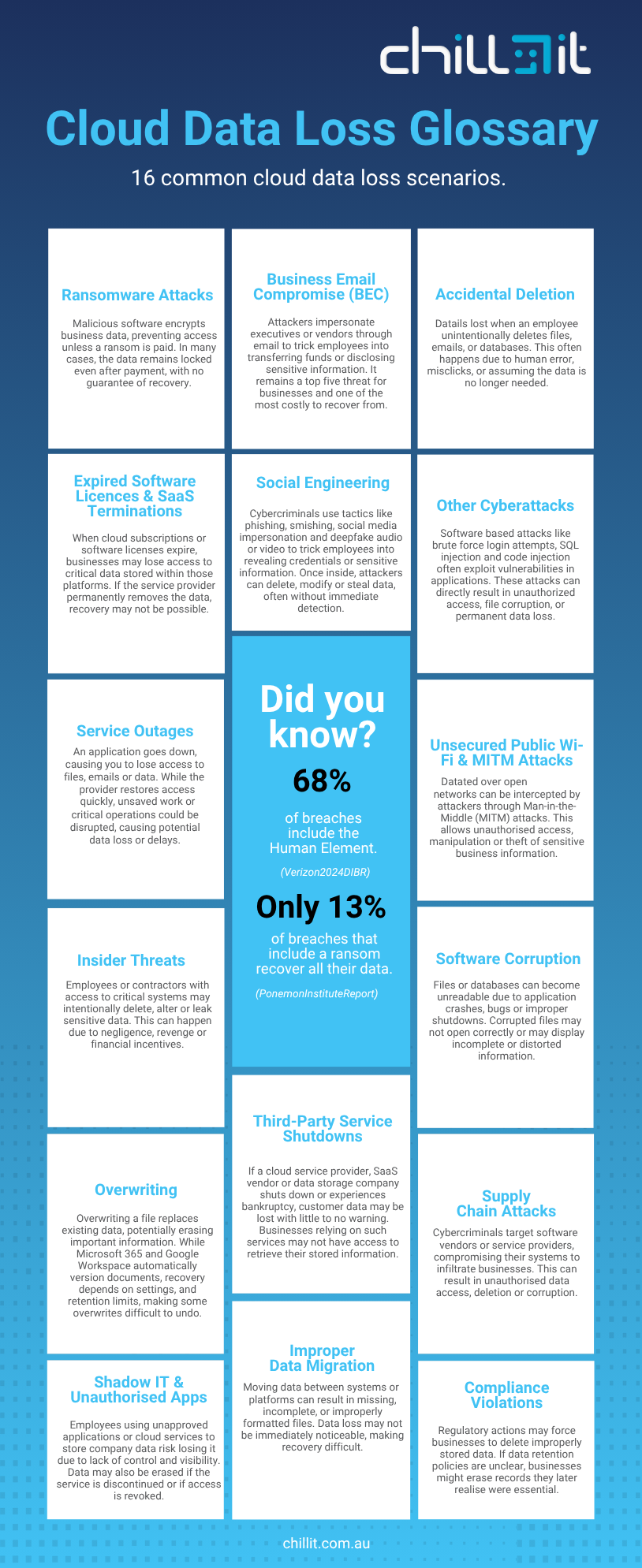
If you aren’t sure what puts your data at risk, here are 16 common cloud data loss scenarios every business should be aware of.
The Stakes Are Higher Than Ever
Data loss is no longer an occasional disaster, it is now a weekly risk. Global research shows that 43% of small businesses never fully recover after a major data loss incident, largely due to the downtime, reputational impact and disruption that follows.
The Real Impact of Data Loss:
- Productivity collapses: teams stop working, projects stall and staff waste hours trying to recreate lost information.
- Client trust takes a hit: missed deadlines, delayed responses and lost files create doubt about reliability.
- Costs escalate quickly: downtime, rework, overtime and missed deliverables can drain tens of thousands from a business.
- Compliance risks increase: lost records, deleted correspondence or missing financial data can put a business out of step with Australian record keeping obligations, creating legal exposure and regulatory penalties.
Cybercriminals are accelerating too. The 2025 SonicWall Cyber Threat Report found that attackers now use newly released exploit code within 48 hours, while organisations take on average 120 to 150 days to apply critical patches. This creates a dangerous window where systems remain vulnerable for months while threat actors strike within days.
It is a timing problem and businesses are on the wrong side of the clock.
How to Strengthen Your Data Loss Prevention Strategy
Your business doesn’t have to sit on the wrong side of the clock. A strong recovery strategy dramatically reduces downtime, protects client trust and keeps your operations moving even when something goes wrong.
Here are a few practical steps that build on the lessons in this blog and help you stay protected:
1. Don’t rely on Microsoft 365 retention, build independent restore points
As covered earlier, Microsoft’s retention policies are limited and time bound. Once the window closes, the data is unrecoverable. A modern backup strategy starts with independent backup copies that sit outside Microsoft 365 so your recovery isn’t tied to retention limits.
2. Enable full monitoring and alerts for your backups
If you’re going to depend on your backups, you need visibility.
Set up alerts for successful backups, sync delays, unusual file activity and failed backups so you know immediately if something isn’t working as expected.
3. Test your recovery regularly, not just the backups
This ties directly into your point that data loss hits at the worst possible moment.
A backup only matters if you can restore quickly.
Schedule routine recovery drills to ensure:
• Your backups are complete.
• Your team can restore data quickly.
• Your restore points align with your business needs.
Think of it as “disaster rehearsal”.
4. Develop a disaster recovery checklist
Create a clear, step by step plan outlining what needs to happen during a data failure. This should include your RPO and RTO targets, who is responsible for each stage of recovery, where your backups are stored, key contacts, escalation paths and how recovery should be performed.
• Recovery Point Objective (RPO): how much data your business can afford to lose (for example, 15 minutes, 1 hour or 1 day of work).
• Recovery Time Objective (RTO): how quickly systems need to be restored before business operations are significantly impacted.
5. Follow the 3-2-1 backup rule
This long-standing principle remains one of the most reliable ways to safeguard your data.
The 3-2-1 rule ensures you always have a safe and accessible copy to recover from, no matter the disaster.
Keep three copies of your data:
• Two stored locally on different devices.
• One stored off-site.
It’s a proven framework for reducing risk and maintaining resilience.
A Modern Recovery Strategy: Automated, Independent and Fast
At Chill IT, we use ConnectWise Cloud Backup™ to give businesses real, reliable protection across Microsoft 365. Instead of relying on limited retention or hoping deleted files can be restored, ConnectWise provides continuous, independent backups that cannot be overwritten, corrupted or lost through normal platform behaviour.
It means if something is deleted at 9.01am, you can restore it at 9.02am exactly as it was.
It turns disasters into minor inconveniences and gives your business a safety net that Microsoft simply cannot provide.
What ConnectWise Cloud Backup delivers:
• Automated daily protection: backups run continuously without manual work or maintenance.
• Independent restore points: recover files, emails, chats and libraries even after Microsoft’s retention expires.
• Fast point in time recovery: restore the exact version of a file from a specific moment, within seconds.
• Full Microsoft 365 coverage: Exchange, SharePoint, OneDrive, Teams and more.
• Local monitoring and support: handled by the Chill IT team, not offshore call centres.
• Secure, compliant storage: data is encrypted, protected and stored across multiple regions.
Don’t wait for a data loss scare to find out what is not backed up. Talk to Chill IT about a recovery plan that keeps your business moving.
Let’s have a chat? Fill in the form below to get in touch.
"*" indicates required fields